
Google Contacts vs ContactBook: Which One Actually Works for Teams in 2026?

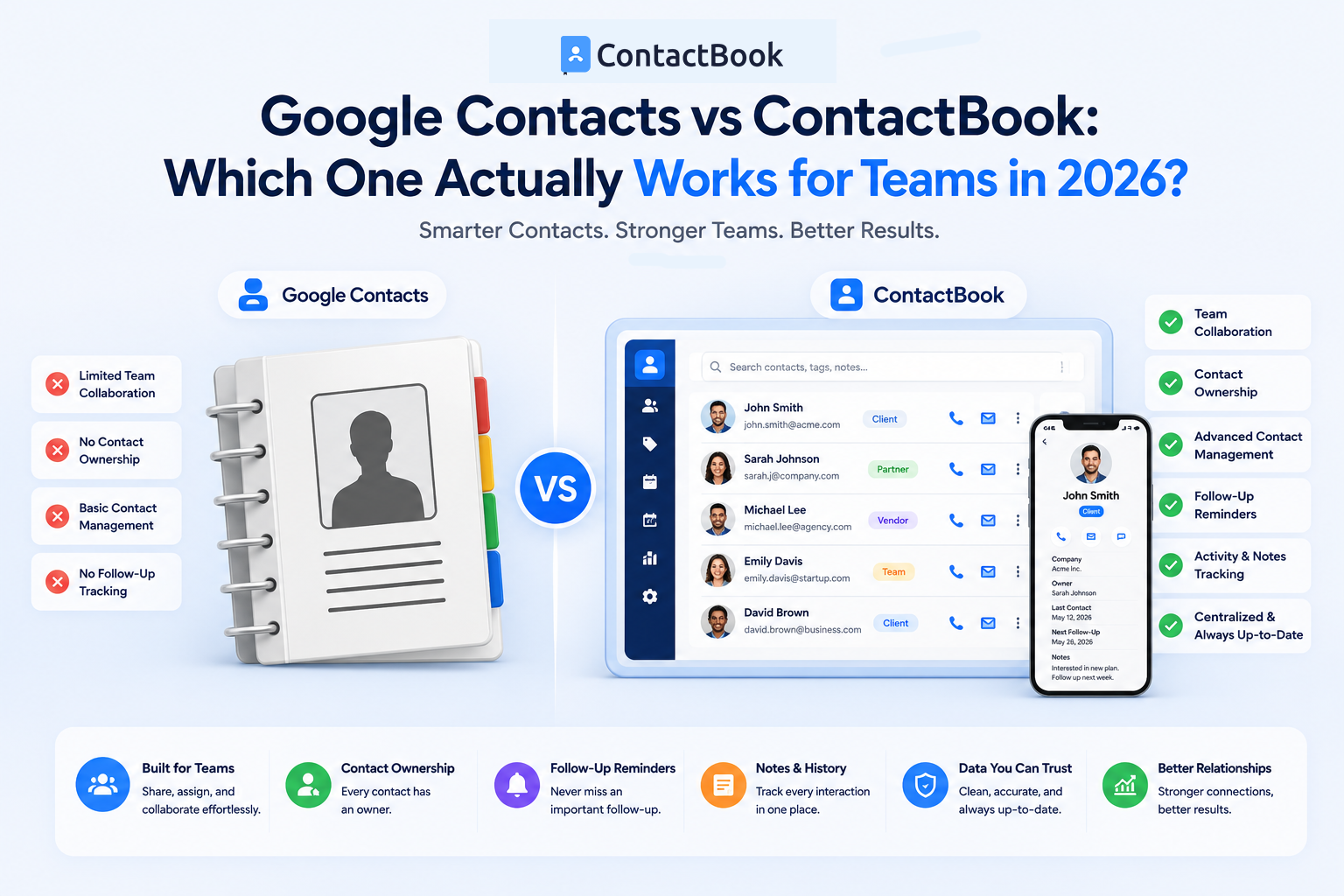
When it comes to managing contacts, most businesses start with Google Contacts.
It's free, easy to use, and already integrated into the Google ecosystem. For individuals, it does a good job of storing phone numbers, email addresses, and basic contact information.
But as teams grow, so do their contact management challenges.
Sales teams need shared access to prospects. Recruiters need collaborative candidate databases. Agencies need centralized client records. Business owners need visibility into relationships across the organization.
This is where many teams discover an important truth:
Google Contacts was designed for individuals. Modern businesses need something built for teams.
In this article, we'll compare Google Contacts and ContactBook across the areas that matter most in 2026 and help you determine which solution is right for your organization.
What Is Google Contacts?
Google Contacts is Google's contact management solution that allows users to store, organize, and synchronize personal contacts across devices.
Key features include:
- Contact storage
- Basic labels and groups
- Gmail integration
- Contact synchronization
- Contact import and export
- Mobile device syncing
For individual users, Google Contacts remains one of the simplest ways to manage personal and professional relationships.
However, its functionality becomes more limited when multiple people need to access and manage the same contact database.
What Is ContactBook?
ContactBook is a collaborative contact management platform designed specifically for businesses and teams.
Instead of treating contacts as personal assets, ContactBook helps organizations create a centralized, shared contact database that can be accessed and managed across departments.
Key capabilities include:
- Shared contact management
- Team collaboration
- Contact sharing permissions
- Contact categorization and tagging
- Business card scanning
- Contact notes and attachments
- Contact backups
- Cross-device synchronization
- Google Workspace integrations
The goal is simple:
Turn scattered contacts into an organized business asset that the entire team can use.
Quick Comparison
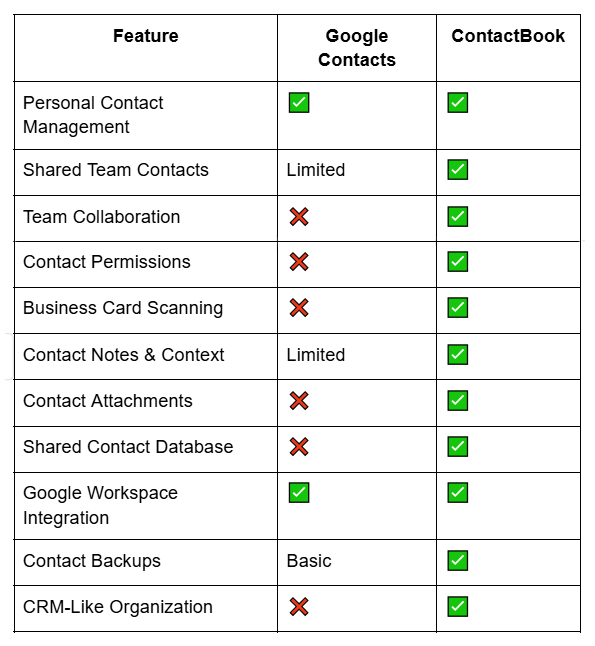
At a glance, both platforms can store contacts. The biggest difference is how they handle collaboration and business relationships.
Round 1: Personal Contact Management
If your goal is simply storing personal contacts, both platforms perform well.
Google Contacts offers:
- Easy setup
- Native Gmail integration
- Automatic syncing
- Mobile accessibility
For freelancers, students, and individual professionals, Google Contacts may be all that's needed.
ContactBook also supports personal contact management but adds organizational capabilities that become valuable as contact lists grow.
Winner: Tie
For individual use, either solution works well.
Round 2: Shared Contacts for Teams
This is where the differences become significant.
Google Contacts stores contacts primarily at the user level.
While there are workarounds using Google Workspace and delegated access, sharing contacts across teams is not a core strength of the platform.
Common problems include:
- Contacts stored in personal accounts
- No central ownership
- Duplicate records across employees
- Limited visibility
ContactBook was built specifically to solve these issues.
Teams can:
- Share contact groups
- Create centralized databases
- Control permissions
- Update records collaboratively
- Maintain a single source of truth
For organizations, this dramatically improves efficiency and collaboration.
Winner: ContactBook
Round 3: Contact Organization
As contact databases grow, organization becomes increasingly important.
Google Contacts provides basic labels and grouping options.
For small contact lists, this may be sufficient.
However, larger organizations often need more advanced organization capabilities.
ContactBook allows teams to:
- Create custom tags
- Categorize contacts
- Build structured groups
- Filter contacts quickly
- Organize records by business purpose
Examples include:
- Clients
- Prospects
- Vendors
- Partners
- Investors
- Candidates
This level of organization makes large contact databases significantly easier to manage.
Winner: ContactBook
Round 4: Business Card Management
Business cards remain an important source of new contacts in 2026.
Google Contacts does not offer native business card scanning functionality.
Users typically need third-party tools to capture and digitize business cards.
ContactBook includes business card scanning capabilities that allow users to:
- Scan cards instantly
- Extract contact details automatically
- Create contact records
- Organize contacts immediately
For sales professionals, recruiters, and business development teams, this can save hours of manual data entry every month.
Winner: ContactBook
Round 5: Team Collaboration
Modern businesses rely heavily on collaboration.
Unfortunately, Google Contacts was never designed as a collaborative contact management platform.
Common challenges include:
- Contact ownership issues
- Information silos
- Duplicate records
- Limited team visibility
ContactBook addresses these challenges by allowing teams to collaborate directly on shared contacts.
Employees can:
- View contact updates
- Add notes
- Attach files
- Share information
- Maintain contact history
Instead of contacts living inside individual inboxes, they become accessible organizational assets.
Winner: ContactBook
Round 6: Relationship Context
A contact record should be more than a name and email address.
Businesses often need additional information such as:
- Meeting notes
- Follow-up reminders
- Documents
- Relationship history
- Internal comments
Google Contacts provides limited support for this type of relationship intelligence.
ContactBook allows users to enrich contact profiles with context that helps teams understand and maintain relationships more effectively.
This becomes particularly valuable when multiple employees interact with the same contact.
Winner: ContactBook
Round 7: Business Continuity
One of the biggest risks businesses face is losing contacts when employees leave.
In organizations using Google Contacts alone, important relationships often remain stored inside individual accounts.
When employees move on, those relationships may become difficult to recover.
ContactBook helps prevent this issue by centralizing contacts at the organizational level.
Benefits include:
- Reduced dependency on individuals
- Better knowledge retention
- Improved continuity
- Long-term relationship protection
For growing businesses, this can be one of the most valuable advantages.
Winner: ContactBook
Who Should Use Google Contacts?
Google Contacts is a great choice if:
- You work independently
- You manage personal contacts only
- You don't need collaboration features
- Your contact list is relatively small
- You already use Google Workspace extensively
For many individuals, Google Contacts remains a simple and effective solution.
Who Should Use ContactBook?
ContactBook is a better fit if:
- You work with a team
- You need shared contacts
- You manage business relationships
- You want centralized contact ownership
- You need business card scanning
- You require advanced organization
- You want stronger collaboration
The larger your team becomes, the greater the value of centralized contact management.
The Real Question Isn't Google Contacts vs ContactBook
Many businesses approach this comparison incorrectly.
They assume the tools serve the same purpose.
In reality, they solve different problems.
Google Contacts helps individuals store contacts.
ContactBook helps organizations manage relationships.
The distinction becomes increasingly important as businesses grow and collaboration becomes essential.
For small personal contact lists, Google Contacts may be enough.
For teams that rely on relationships to generate revenue, manage clients, recruit talent, or build partnerships, a collaborative contact management platform provides significantly greater value.
Conclusion
Google Contacts remains one of the best free personal contact management tools available.
It's simple, reliable, and deeply integrated with Google's ecosystem.
However, when it comes to team collaboration, shared contact management, business continuity, and relationship organization, its limitations become apparent.
ContactBook was built to address these challenges.
By centralizing contacts, enabling collaboration, organizing relationships, and creating a shared source of truth, it helps businesses treat contacts as organizational assets rather than personal information stored in isolated accounts.
Choose Google Contacts if:
- You manage contacts individually.
- You need basic contact storage.
- Collaboration is not a priority.
Choose ContactBook if:
- Your team shares relationships.
- You need visibility across departments.
- You want centralized contact management.
- You want to protect valuable business relationships.
In 2026, the question isn't simply where you store contacts. It's how effectively your team can use them. And that's where the difference becomes clear.

.png)


.svg)


.svg)



