
Organize Your Contacts Like a Pro: A Simple Business System

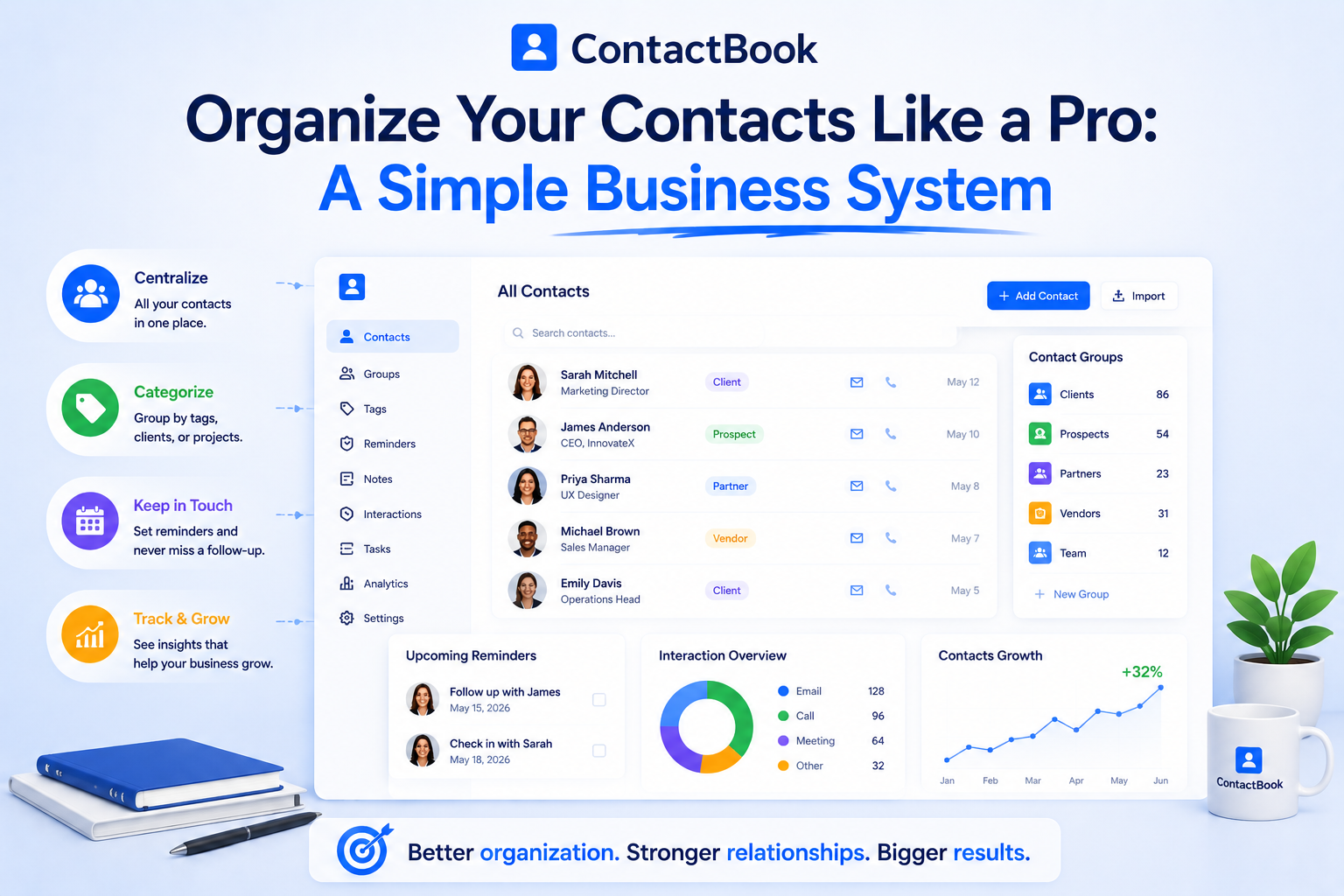
Most businesses do not have a contact problem. They have a contact chaos problem.
The names are there. The emails are there. The phone numbers are there. But they are scattered across personal phones, inboxes, spreadsheets, LinkedIn messages, WhatsApp chats, business cards, website forms, and old CSV files.
That chaos quietly costs money. A lead does not get a follow-up. A client detail is forgotten. A vendor’s updated number is saved on only one employee’s phone. A referral partner goes cold. A team member leaves, and important relationships leave with them.
Contact organization is not just about keeping your address book clean. It is about protecting business opportunities.
The smartest businesses treat contacts as relationship assets. They do not simply save contacts. They organize them, add context, assign meaning, share them with the right people, and follow up at the right time.
That is where a simple business contact management system can change everything.
Your Contact List Is a Map of Opportunity
Many teams look at contacts as static information: name, number, email, company. But every contact has a possible direction.
A lead can become a client. A client can become a repeat customer. A vendor can become a partner. A student can become an alumni connection. A donor can become a long-term supporter. A candidate can become a future hire. A referral partner can become a steady source of new business.
When contacts are organized properly, your team can see these opportunities clearly. When they are scattered, those opportunities become invisible.
This is why professional contact organization starts with a mindset shift: your contact list is not storage. It is a business network that needs structure.
ContactBook helps businesses make this shift by turning scattered contacts into organized, searchable, and shareable relationship data.
The Real Cost of Messy Contacts
Messy contacts do not always create obvious problems immediately. The damage usually happens quietly.
A sales team may contact the same lead twice with different messages. A recruiter may forget a strong candidate from three months ago. A real estate agent may lose track of a buyer who said they were “not ready yet.” A nonprofit may miss the right time to reconnect with a donor. A school may have parent or staff contacts saved across different people’s devices.
These issues may look small, but together they create lost revenue, poor communication, and weak follow-ups.
Messy contacts usually lead to five problems:
- Lost opportunities because nobody remembers to follow up.
- Duplicate work because multiple people manage the same contact separately.
- Outdated information because contact details are not updated in one place.
- Weak personalization because conversation history is missing.
- Team dependency because contacts are locked inside individual phones or inboxes.
A professional contact system fixes these problems by giving your team one reliable place to manage relationship information.
The Contact Operating System Every Business Needs
Instead of treating contact organization as a one-time cleanup, think of it as a contact operating system.
A contact operating system is a simple repeatable process for how every important contact enters, gets organized, gets updated, and gets followed up.
It does not need to be complicated. It only needs five layers: source, category, context, action, and access.
When every contact has these five layers, your team can manage relationships more professionally. You know where the contact came from, what type of contact they are, what you know about them, what should happen next, and who on the team should have access.
ContactBook is built around this kind of practical workflow. It gives businesses the structure to capture contacts, group them, tag them, add notes, set reminders, and share them with the right team members.
Layer 1: Source — Know Where Every Contact Came From
The source of a contact tells you how the relationship began. This matters because a referral lead, event lead, website inquiry, old client, and LinkedIn connection should not be handled the same way.
Someone who came through a referral may already trust you more than someone who downloaded a resource. A person you met at an event may need a fast follow-up while the conversation is still fresh. A past client may need nurturing, not a sales pitch.
Useful contact sources may include website forms, events, referrals, LinkedIn, email campaigns, business cards, webinars, client introductions, social media, or existing customer databases.
With ContactBook, you can use groups, tags, and notes to record where contacts came from, so future follow-ups feel more relevant.
Layer 2: Category — Stop Treating Every Contact the Same
One of the biggest mistakes businesses make is putting everyone into one long list.
Clients, leads, vendors, partners, employees, investors, candidates, donors, students, and referral partners all play different roles. If they are mixed together without structure, your team wastes time searching and guessing.
Categories give your database shape.
A real estate team may organize contacts into buyers, sellers, brokers, builders, tenants, and investors. A recruiter may organize candidates, clients, hiring managers, and referrals. A nonprofit may organize donors, volunteers, sponsors, partners, and community members.
ContactBook makes this easier with contact groups. Instead of scrolling through a messy list, teams can create clear groups based on how the business actually works.
Layer 3: Context — The Details That Make Follow-Ups Work
A contact without context is just a name.
Context tells your team what was discussed, what the person needs, what they care about, what was promised, and what should happen next.
This is often where spreadsheets fail. You may have a “notes” column, but it quickly becomes messy, inconsistent, and hard to use. Important details get buried in rows, tabs, and old versions.
In a professional contact system, every important contact should include short, useful context.
For example:
Met at startup event. Looking for a simple way to share investor contacts with team. Follow up after budget meeting.
That one note can save your team from starting the conversation from zero.
ContactBook allows users to add notes directly to contacts, helping teams keep relationship memory in one place.
Layer 4: Action — Every Important Contact Needs a Next Step
Many contacts become useless because nobody decides what happens next.
A lead is added. A note is written. Then nothing.
Professional contact management is different. Every important contact should have a next action. That action could be a follow-up call, demo, email, document share, meeting, check-in, renewal reminder, referral request, or status update.
This is where reminders become powerful.
A reminder turns a passive contact into an active relationship. If someone says, “Reach out next month,” that should not live in someone’s memory. It should become a reminder.
ContactBook helps teams set follow-up reminders so important relationships do not disappear after the first conversation.
Layer 5: Access — Contacts Should Not Be Trapped in One Person’s Phone
In many businesses, the most valuable contacts are locked inside individual phones, inboxes, or spreadsheets.
That is risky.
If an employee is unavailable, leaves the company, or forgets to share information, the business loses access to important relationships. This is especially dangerous for teams that rely on sales, recruiting, partnerships, fundraising, client management, or field operations.
A professional contact system makes contact access intentional. The right people should have access to the right contact groups.
ContactBook allows teams to share contact groups, making collaboration easier and reducing dependency on individual team members.
This is one of the biggest reasons businesses move beyond spreadsheets and personal phonebooks.
The Simple Contact Rule
To keep your system practical, use this rule:
Every important business contact should answer four questions:
- Who is this person?
- Why do they matter?
- What do we know about them?
- What should happen next?
If your contact database cannot answer these questions quickly, it is not organized enough.
This rule keeps your team focused. You do not need to overcomplicate contact management with endless fields and workflows. You only need enough information to make the relationship useful.
ContactBook supports this simple rule through contact details, groups, tags, notes, reminders, and sharing.
Why ContactBook Creates Authority for Your Team
Professional contact organization affects how your business appears to clients, leads, partners, and stakeholders.
When your team remembers details, follows up on time, avoids repeated questions, and communicates consistently, people notice. It makes your business feel reliable.
ContactBook helps create that professional experience. Your team can quickly find the right contact, understand the relationship, see notes, use tags, and follow up at the right time.
Instead of saying, “Let me check with someone,” or “I think that number is in another file,” your team has the information ready.
This creates authority because organized teams appear more trustworthy.
A business that manages contacts well manages relationships well.
ContactBook Features That Support a Professional Contact System
ContactBook gives businesses the tools they need to manage contacts like a real business asset.
Centralized contacts help your team keep all important people in one place instead of scattering them across phones, inboxes, and spreadsheets.
Groups help organize contacts by relationship type, team, project, industry, or business purpose.
Tags add flexible labels such as hot lead, referral partner, event contact, high priority, renewal due, donor, candidate, or vendor.
Notes help preserve relationship memory so your team knows what was discussed and what matters.
Reminders help prevent missed follow-ups and keep relationships active.
Contact sharing allows the right team members to access the right contacts without passing around files.
Web and mobile access makes contact information available wherever work happens.
Together, these features help teams move from contact chaos to contact clarity.
Final Thoughts
Organizing contacts like a pro is not about creating a perfect database. It is about building a simple system that helps your business act faster, communicate better, and protect important relationships.
Start by centralizing your contacts. Then organize them by source, category, context, action, and access. Make sure every important contact answers four questions: who they are, why they matter, what you know about them, and what should happen next.
This is how contacts become more than stored information. They become business opportunities.
ContactBook is built to make this system simple. It gives teams the structure to organize contacts, share them, add notes, use tags, set reminders, and manage relationships from one place.
If your contacts are currently scattered across phones, spreadsheets, inboxes, and personal accounts, now is the time to turn them into a real business asset.
With ContactBook, your team can organize contacts like a pro and build stronger relationships with confidence.

.png)


.svg)


.svg)



