
Shared Address Book vs CRM: Which Does Your Team Need?

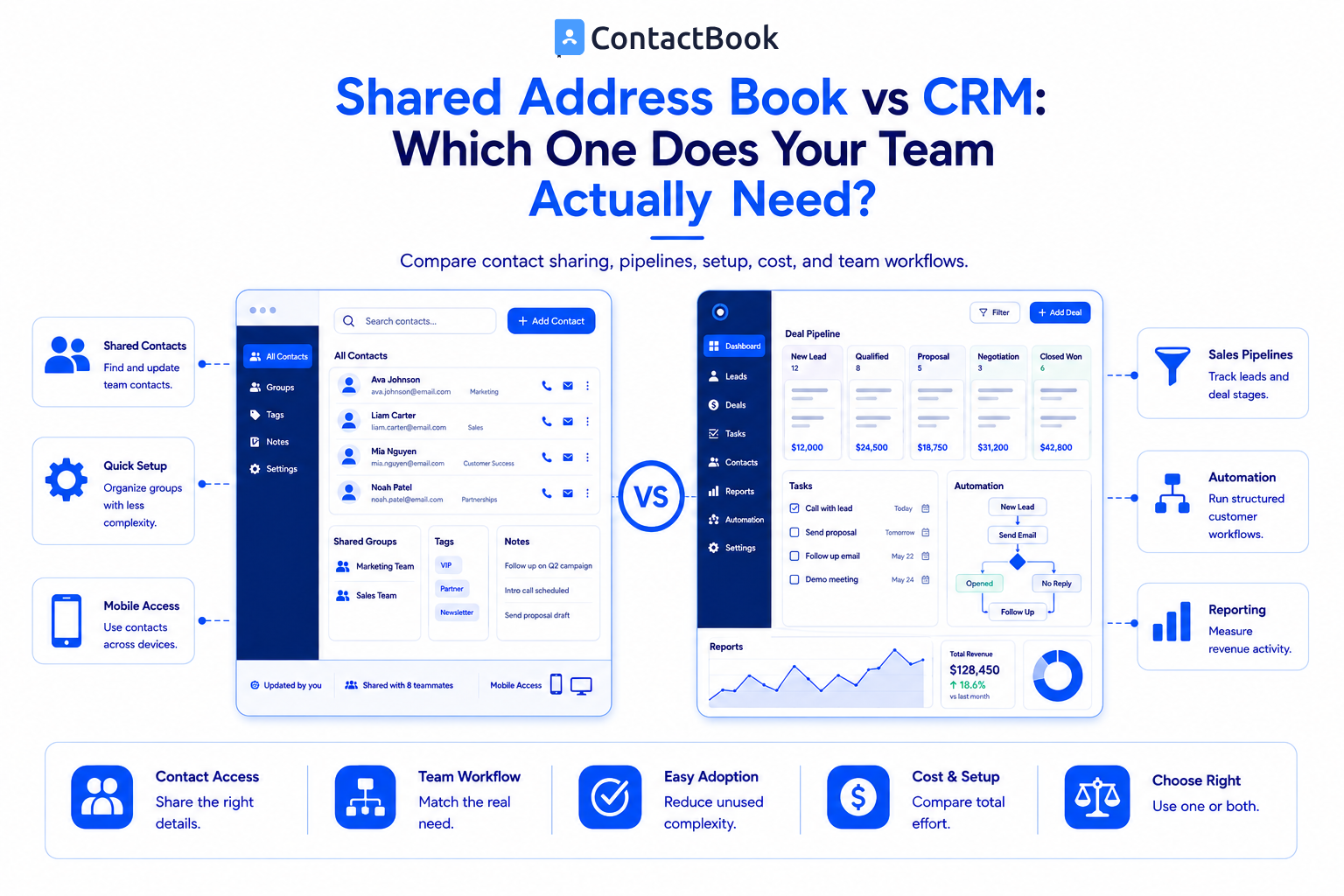
A shared address book gives employees access to organized, up-to-date team contacts. A CRM manages a broader customer process, including leads, deals, pipelines, activities, automation, and reports.
Choose a shared address book if your main problem is finding, sharing, and updating contacts. Choose a CRM if your team needs to manage a structured sales or customer lifecycle. Some businesses use both because the tools solve different problems.
Shared Address Book vs CRM: Quick Comparison
What Is a Shared Address Book?
A shared address book is a central contact list that authorized teammates can access. Instead of keeping customer, supplier, partner, or employee information in personal phones and separate spreadsheets, the team works from a common source.
A modern team address book may include:
- Shared contact groups
- View, edit, and management permissions
- Tags and search
- Public and private notes
- Contact imports
- Mobile access
- Contact synchronization
- Backup and activity information
The goal is simple: help the right people find and maintain the right contact information.
What Is a CRM?
A customer relationship management system stores contacts within a broader operating process. It may track how a lead entered the business, which salesperson owns it, what stage a deal has reached, which emails were sent, and what action should happen next.
Common CRM capabilities include:
- Lead and deal pipelines
- Task assignment
- Email and activity tracking
- Workflow automation
- Sales forecasting
- Conversion reporting
- Marketing or support integrations
- Custom records and fields
A CRM is valuable when a team needs structured relationship and revenue management, not only contact access.
1. Start With the Problem, Not the Feature List
Teams often buy a CRM because it appears to include everything. They later discover that employees only wanted a current list of customers, vendors, or partners on their phones.
Ask these questions first:
- Are contacts scattered across phones, inboxes, and spreadsheets?
- Does the team need to share selected contact groups?
- Do different users need different access levels?
- Do you need notes and tags, or complete sales pipelines?
- Must managers forecast revenue and analyze deal stages?
- Will employees consistently update a complex CRM?
If the first three questions describe the main problem, start by evaluating a shared address book. If the later questions are essential, evaluate a CRM.
2. Contact Sharing and Ownership
Contact sharing is the central purpose of a shared address book. A team can create lists for customers, suppliers, partners, emergency contacts, or event attendees and give access only to relevant users.
CRMs also share contact records, but they organize access around a wider customer process. Ownership may be tied to leads, territories, deals, or account teams.
Use a shared address book when contact availability is the outcome. Use a CRM when the contact record must drive structured business activity.
3. Ease of Adoption
A shared address book is normally easier to explain: add contacts, group them, share them, and keep them updated.
A CRM may require teams to define pipelines, stages, required fields, automations, dashboards, and reporting rules. This work is worthwhile when the business needs it. It creates unnecessary friction when employees only need reliable contact details.
Adoption matters more than theoretical capability. An advanced system provides little value when users avoid it or keep separate spreadsheets.
4. Context, Notes, and Collaboration
Both tools can store more than names and phone numbers.
A shared address book may support notes, tags, groups, and activity history. This is enough for lightweight context such as “preferred supplier,” “event sponsor,” or “call after 3 PM.”
A CRM usually provides richer timelines, logged communication, tasks, lead sources, deal values, and workflow history. Choose that level of context when it supports a defined process.
5. Mobile Contact Access
Field employees, service teams, recruiters, and business owners often need contacts directly on Android or iPhone. A shared address book can make this use case more direct because mobile contact access is part of its core purpose.
Many CRMs have mobile apps, but users may need to open the CRM, locate the record, and use its calling or messaging tools. Neither approach is universally better. Test how employees actually work before deciding.
6. Cost and Maintenance
The subscription price is only one part of the cost.
A CRM may require setup, customization, integrations, administration, data standards, and ongoing training. A shared address book normally has a narrower maintenance burden.
A CRM can still provide better value when it improves a revenue process. A shared address book is more cost effective when a team does not need those additional capabilities.
Where ContactBook Fits
ContactBook is designed for shared contact management rather than advanced sales pipeline management.
It can bring contacts together from Google, Microsoft, CSV, and VCF sources. Teams can create shared groups and Spaces, invite collaborators, assign permissions, organize contacts with tags, search by contact details, and add public or private notes. Google sync, cross domain sharing, a Chrome extension, and mobile apps support access across common team workflows.
ContactBook can be a lightweight CRM alternative when “CRM” really means a shared list with useful notes. It is not the right replacement when a team needs deal stages, revenue forecasting, advanced automation, or complete sales reporting.
Can a Team Use Both?
Yes. A CRM can remain the system for leads and deals, while a shared address book makes selected contacts conveniently available to operations, support, or field teams.
Before combining systems, decide:
- Which platform owns each contact field?
- Who is allowed to edit records?
- How are duplicates handled?
- Which contacts should be shared?
- How quickly must updates appear?
- What happens when an employee leaves?
Clear ownership prevents conflicting versions of the same contact.
Decision Checklist
Choose a shared address book if:
- Contact information is scattered
- Employees need shared groups on desktop and mobile
- You need simple permission controls
- Notes and tags provide enough context
- A full CRM would add unnecessary complexity
Choose a CRM if:
- You manage leads and deals through defined stages
- Sales automation is important
- Managers need forecasting and pipeline reports
- Communications and tasks must be tracked centrally
- Multiple customer teams need structured workflows
Frequently Asked Questions
Is a shared address book a CRM?
No. It focuses on organizing and sharing contacts. A CRM manages a wider customer or sales process.
Can a small business use a shared address book instead of a CRM?
Yes, when the business mainly needs shared contacts, notes, tags, and permissions. A CRM is more appropriate when deals, pipelines, automation, or reporting become necessary.
Is ContactBook a CRM alternative?
ContactBook can be an alternative for teams that need lightweight shared contact management. It does not replace advanced CRM functionality.
Which system is easier to set up?
A shared address book is generally easier because it solves a narrower problem. CRM setup varies based on pipeline and automation requirements.
Can a CRM and shared address book work together?
Yes, but the team should define data ownership and update rules to avoid duplicates and conflicting records.
Which option is better for mobile teams?
Choose the option that makes required contacts available in the employees’ real workflow. Test access, permissions, and updates on both Android and iPhone before rollout.
Final Thoughts
The shared address book vs CRM decision becomes easier when you focus on the job your team must complete. Do not pay for a complex sales system to solve a basic contact sharing problem. Do not expect a simple address book to run an advanced revenue process.
Next step: Start a ContactBook free trial if your team needs a simple, centralized way to share and maintain business contacts.

.png)


.svg)


.svg)



