
Spreadsheets vs CRM vs ContactBook: What Actually Works in 2026?

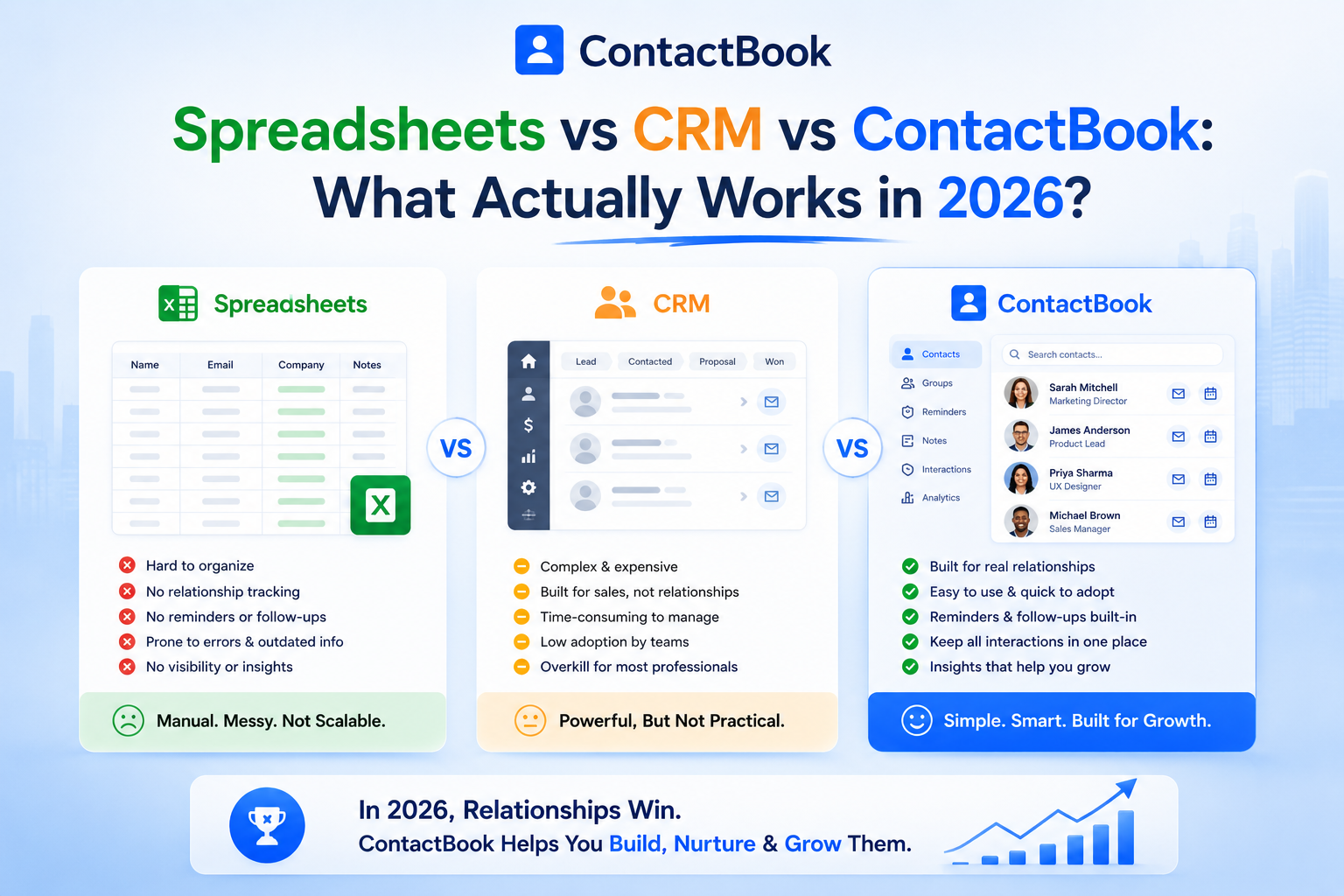
In 2026, contact management is no longer just about saving names, phone numbers, and email addresses. Every contact can represent a lead, client, vendor, partner, candidate, donor, student, patient, or referral opportunity.
The problem is that many teams still manage these important relationships with tools that were not built for modern contact management. Some rely on spreadsheets, which become messy as the business grows. Others invest in expensive CRMs, only to realize they are paying for complex sales features their team rarely uses.
This is why many growing teams need a better middle ground.
ContactBook gives businesses a simple, organized, and affordable way to manage contacts without the limitations of spreadsheets or the complexity of traditional CRMs. It helps teams centralize contacts, share them securely, add notes, create groups, use tags, set reminders, and access contact information from anywhere.
If your team needs better contact organization without paying for a heavy CRM, ContactBook is built for exactly that.
Why Contact Management Matters More in 2026
A contact is not just a record. It is a relationship.
For sales teams, a contact may become a client. For recruiters, it may be a candidate or hiring manager. For real estate professionals, it may be a buyer, seller, broker, or builder. For schools, it may be a student, parent, teacher, or staff member. For nonprofits, it may be a donor, volunteer, or partner.
When this information is scattered across personal phones, inboxes, spreadsheets, and individual accounts, teams lose visibility. They forget follow-ups, duplicate records, use outdated information, and waste time searching for details.
Modern teams need a contact management system that is:
- Easy to use
- Affordable for growing teams
- Built for collaboration
- Accessible across devices
- Organized with tags and groups
- Useful for notes, reminders, and follow-ups
- Simple enough for daily use
This is where the difference between spreadsheets, CRMs, and ContactBook becomes clear.
Option 1: Spreadsheets for Contact Management
Spreadsheets are often the first tool businesses use because they are familiar and easy to start. You can create columns for names, phone numbers, emails, companies, notes, and status within minutes.
For a very small contact list, spreadsheets may work. But they were never designed to manage real relationships.
As your contacts grow, spreadsheets become harder to maintain. Different team members may create different versions. Contact details become outdated. Notes get buried inside cells. Follow-ups are easy to forget. There is no simple way to manage permissions, track context, or share contact groups professionally.
Spreadsheets may work if:
- You have a very small contact list.
- Only one person manages contacts.
- You do not need reminders or contact history.
- You only need basic storage.
Spreadsheets fall short when:
- Multiple team members need access.
- You need to organize contacts into groups.
- You want to track conversations or notes.
- You need reminders for follow-ups.
- You want clean, updated, searchable contact data.
Spreadsheets are a starting point, not a long-term contact management solution.
Option 2: Traditional CRMs
Traditional CRMs are built to manage sales pipelines, deals, revenue tracking, automation, reports, and customer activity. For large sales teams with complex processes, a CRM can be useful.
But many businesses do not need a full sales platform. They need a better way to manage contacts.
A traditional CRM can feel overwhelming for teams that simply want to store, organize, share, and follow up with contacts. Many CRMs require setup, training, customization, and ongoing admin work. They also tend to become expensive as more users and features are added.
CRMs may work if:
- You have a large sales team.
- You need deal pipelines and revenue forecasting.
- You require advanced automation.
- You have time for training and setup.
- You have the budget for monthly per-user pricing.
CRMs may be too much if:
- You mainly need contact management.
- Your team wants something simple.
- You do not need complex sales dashboards.
- You want to avoid high software costs.
- Your team struggles to adopt complicated tools.
Traditional CRMs are powerful, but for many teams, they are more complex and expensive than necessary.
Option 3: ContactBook
ContactBook is built for teams that want contact management to be simple, organized, and collaborative.
It gives you more structure than a spreadsheet, but without the cost and complexity of an expensive CRM. Instead of forcing every contact into a sales pipeline, ContactBook helps you manage people and relationships in a practical way.
With ContactBook, teams can store contacts in one place, create groups, add tags, save notes, attach important details, set reminders, and share contacts securely with the right people.
This makes ContactBook useful for sales teams, recruiters, real estate professionals, agencies, nonprofits, schools, healthcare providers, financial services, and small businesses that need organized contact access without a complicated CRM system.
Spreadsheets vs CRM vs ContactBook: Quick Comparison
The comparison is simple: spreadsheets are too limited, CRMs are often too heavy, and ContactBook gives growing teams the balance they actually need.
Why ContactBook Is Better Than Expensive CRMs for Contact Management
Expensive CRMs are designed for complex sales operations. ContactBook is designed for practical contact management. That difference matters.
Many businesses do not need pipeline forecasting, advanced deal automation, or complex dashboards. They need a tool that helps them find contacts quickly, organize them clearly, share them with the right team members, and follow up on time.
ContactBook is better for these teams because it focuses on the features they actually use every day.
1. ContactBook is easier to adopt
A tool only works if your team uses it. Many CRMs fail because they feel complicated. Team members avoid logging in, skip updates, and continue saving contacts in phones or spreadsheets.
ContactBook is simple enough for everyday use. Teams can quickly add contacts, organize them, share them, and update notes without long training sessions.
2. ContactBook is more affordable
Traditional CRMs often charge per user every month, and important features may sit behind higher-priced plans. As your team grows, the cost increases quickly.
ContactBook gives teams a more affordable way to manage contacts without paying for unnecessary CRM features. If your main need is contact organization, sharing, notes, and reminders, ContactBook helps you get the essentials without the heavy CRM price tag.
3. ContactBook is built around contacts, not only sales deals
Not every relationship is a sales opportunity. Some contacts are vendors, partners, students, candidates, donors, patients, volunteers, or referral sources.
ContactBook works for all types of contact relationships. This makes it more flexible for teams outside traditional sales, including education, healthcare, recruitment, nonprofits, real estate, financial services, and agencies.
4. ContactBook keeps contact data centralized
When contacts are stored across phones, inboxes, spreadsheets, and personal accounts, teams lose control. ContactBook brings everything into one organized place so important contacts are easier to access and manage.
This helps reduce confusion, duplicate work, and missed opportunities.
5. ContactBook supports better follow-ups
Many potential clients are lost because no one follows up at the right time. ContactBook helps users add reminders and notes so they know when to reconnect and what to say.
This turns contact management into relationship management.
Why ContactBook Is an Affordable CRM Alternative
ContactBook is not trying to be another complicated CRM. It is a smarter alternative for teams that want practical contact management without expensive software.
With traditional CRMs, you may pay for features like advanced automation, pipeline forecasting, detailed sales reports, and enterprise workflows. These features may be useful for large sales departments, but many teams never use them.
ContactBook focuses on the essentials: contacts, groups, tags, notes, reminders, sharing, and accessibility.
That means your team gets the tools needed to manage relationships without paying for unnecessary complexity. For small businesses, agencies, recruiters, real estate professionals, nonprofits, schools, and growing teams, this makes ContactBook a more affordable and practical choice.
If your goal is to manage contacts better, not manage a complicated sales machine, ContactBook offers better value.
When Should You Choose Each Tool?
Choose spreadsheets if your contact list is very small, only one person manages it, and you only need basic storage.
Choose a traditional CRM if your company has a large sales team, complex sales pipelines, advanced reporting needs, and enough budget for setup and monthly costs.
Choose ContactBook if your team needs a simple, affordable, and professional way to organize, share, and follow up with contacts.
For most growing teams in 2026, ContactBook offers the best balance between simplicity, collaboration, and affordability.
Final Thoughts
Spreadsheets, CRMs, and ContactBook all help manage contacts in different ways, but they are not equal.
Spreadsheets are simple, but they become messy as your contact list grows. Traditional CRMs are powerful, but they can be expensive and complicated for teams that only need contact management.
ContactBook gives teams a better option. It is easier than a CRM, more organized than a spreadsheet, and more affordable for businesses that want practical contact management.
In 2026, the best contact management tool is not always the biggest or most expensive platform. It is the one your team can actually use every day.
For teams that want to organize contacts, share them securely, add notes, set reminders, and manage relationships without complexity, ContactBook is the smarter choice.

.png)


.svg)


.svg)



